
snlp-2
First steps with PyTorch
Overview
In this tutorial, we'll walk through how to implement, train, and evaluate a neural network using PyTorch.
Objectives
- define a simple neural network in PyTorch as a sequence of layers/operations
- train a simple neural network using gradient descent
- evaluate the performance of a neural network classifier written in PyTorch
Getting started
In order to follow along, ensure you've configured your development environment with a working docker installation.
Introduction
We'll walk through the steps involved in defining, training, and evaluating a simple form of neural network composed of a single neuron, the binonomial logistic regression classifier.
You can execute the code snippets that follow in the provided docker image:
docker run -it -p 127.0.0.1:8888:9999 git.hlt.parsertongue.org/teaching/docker-images/pytorch:latestOpen your browser to localhost:8888, enter the token printed in the terminal, and create a new notebook (New Python 3 (ipykernel)).
Let's import PyTorch and define a value for our random seed to keep our example reproducible:
from typing import *
from torch import nn
import torch

SEED = 42
Tensor basics
Before we define a model, let's get comfortable with the tensors† we'll pass between its layers. A shape tells us how many values lie along each axis. It doesn't tell us what those axes mean. We'll need to keep track of that ourselves.
Read the axes and locate a value
Imagine two clowns. Each row describes one clown, with height and nose diameter measured in centimeters. We'll use illustrative values, including suitably oversized clown noses:
import torch

clowns = torch.tensor([[170, 6], [185, 8]])
print(tuple(clowns.shape))  # (2, 2)
print(clowns[1, 0].item())  # 185
Axis 0 runs over examples (ex. datapoint 1, datapoint 2, …). Here, those examples are clowns! Axis 1 runs over features. The indices start at zero, so clowns[1, 0] selects the second clown's height. .item() gives us the ordinary Python number from that single-value tensor.
| Height (cm) | Nose diameter (cm) | |
|---|---|---|
| Clown 0 | 170 | 6 |
| Clown 1 | 185 | 8 |
Number axes from the end
PyTorch also supports negative dimension indices. dim=-1 means the last axis, dim=-2 means the second-to-last axis, and so on. For our rank-2 clowns tensor, dim=-1 and dim=1 refer to the same feature axis. For a tensor with three axes, dim=-1 refers to axis 2 instead.
This is useful when we want to operate along the last axis without counting how many axes precede it. The meaning of that axis still depends on the tensor. "Last" doesn't automatically mean "features"!
Add another feature
We've already defined our clowns, but what about their shoes? Let's add shoe_size, measured as the shoe's length in centimeters, not a conventional shoe-size label. These are clown shoes, so we'll make them super duper big:
shoe_size = torch.tensor([45, 50])
print(tuple(shoe_size.shape))  # (2,)

shoe_column = shoe_size.unsqueeze(1)
print(tuple(shoe_column.shape))  # (2, 1)

clowns = torch.cat([clowns, shoe_column], dim=1)
print(clowns.tolist())
# [[170, 6, 45], [185, 8, 50]]
shoe_size contains one feature across two clowns. Each row of clowns contains one clown's feature vector. We keep the clowns in the same order so each shoe length belongs to the right clown.
unsqueeze(1) adds an axis of length one, turning the shoe lengths into a column. It doesn't add new values. Now both tensors have two axes and two rows. torch.cat(..., dim=1) joins them along the feature axis, giving us shape (2, 3): two clowns, three features each†. Joining along axis 0 would mean adding examples instead, not adding a feature to each existing clown.
| Height (cm) | Nose diameter (cm) | Shoe length (cm) | |
|---|---|---|---|
| Clown 0 | 170 | 6 | 45 |
| Clown 1 | 185 | 8 | 50 |
Add another example
What if another clown joins us? This time, we need a new row with the same three features, in the same order:
# Height, nose diameter, and shoe length, all in centimeters.
new_clown = torch.tensor([[160, 7, 55]])
more_clowns = torch.cat([clowns, new_clown], dim=0)

print(tuple(more_clowns.shape))  # (3, 3)
print(more_clowns.tolist())
# [[170, 6, 45], [185, 8, 50], [160, 7, 55]]
The double brackets give new_clown shape (1, 3): one example with three features. Joining along dim=0 adds an example, while joining along dim=1 adds a feature to each example. The other axis must match: a new row needs the existing three features, and a new feature column needs one value for each existing clown.
We've stored the larger group in more_clowns. For the next examples, we'll keep using the original two rows in clowns.
Swap axes with transpose
Suppose another operation expects features first and examples second. We don't want to invent new values or change which feature belongs to which example. We want to swap the axes.
transposed = clowns.transpose(0, 1)
print(tuple(transposed.shape))  # (3, 2)
print(transposed.tolist())     # [[170, 185], [6, 8], [45, 50]]
print(transposed[2, 1].item())  # 50
Each old column is now a row. The feature and example indices trade places: clowns[example, feature] matches transposed[feature, example]. PyTorch's transpose documentation describes the two axes we specify.
| Clown 0 | Clown 1 | |
|---|---|---|
| Height (cm) | 170 | 185 |
| Nose diameter (cm) | 6 | 8 |
| Shoe length (cm) | 45 | 50 |
Reshape is a different operation
PyTorch supports many tensor transformations. Another option is reshape, which lets us specify a new shape for the same values.
Could we get the same shape with reshape(3, 2)? Yes. Would it give us the same arrangement? Let's check:
reshaped = clowns.reshape(3, 2)
print(reshaped.tolist())  # [[170, 6], [45, 185], [8, 50]]
Here, reshape regroups the values into three rows of two. It doesn't swap the example and feature axes. Both results have shape (3, 2), but their values occupy different positions. For instance, transposed[0, 1] is the second clown's height, 185, while reshaped[0, 1] is the first clown's nose diameter, 6.
When would we want reshape?
We'll leave the clowns in their car for a moment and consider a different example: a dataset of given and family names. Each datapoint is a sequence of exactly two items (a given and a family name).
For example, our two datapoints could be ("Ada", "Lovelace") and ("Grace", "Hopper"). Position 0 holds the given name, and position 1 holds the family name. We'll represent each name with three features, in this order: character count, vowel count, and whether it ends in a vowel (1 for yes, 0 for no). For this example, we'll count a, e, i, o, and u as vowels, ignoring case.
| Name | Character count | Vowel count | Ends in a vowel |
|---|---|---|---|
| Ada | 3 | 2 | 1 |
| Lovelace | 8 | 4 | 1 |
| Grace | 5 | 2 | 1 |
| Hopper | 6 | 2 | 0 |
Our axes are now (datapoints, name positions, features), with shape (2, 2, 3). A classifier might expect one feature vector per datapoint instead. Here, we want to combine the name position and feature axes, not swap them:
examples = torch.tensor([
    [[3, 2, 1], [8, 4, 1]],  # Ada, Lovelace
    [[5, 2, 1], [6, 2, 0]],  # Grace, Hopper
])
flat_examples = examples.reshape(2, 6)

print(flat_examples.tolist())
# [[3, 2, 1, 8, 4, 1], [5, 2, 1, 6, 2, 0]]
Each row still belongs to one datapoint. We've gathered the six feature values for its given and family names into one vector and kept their order: the given name's three features, followed by the family name's three features. That's a useful job for reshape! In contrast, transpose lets us change which axis comes first while keeping the axes separate. This flattened representation no longer has a separate name position axis, and a classifier expecting six features would need that same input size for every datapoint.
Add or remove a batch dimension
Now take one datapoint, ("Ada", "Lovelace"), with two name positions and the same three features at each position. To pass that sequence as a batch of size one, we can add an axis:
sequence = torch.tensor([[3, 2, 1], [8, 4, 1]])
one_batch = sequence.unsqueeze(0)
print(tuple(one_batch.shape))  # (1, 2, 3)
print(one_batch[0].tolist())   # [[3, 2, 1], [8, 4, 1]]

restored = one_batch.squeeze(0)
assert torch.equal(restored, sequence)
unsqueeze(0) inserts an axis of length one at position 0. It doesn't duplicate the sequence. squeeze(0) removes that axis when its length is one.
single_feature = torch.tensor([[[10], [20]]])
print(tuple(single_feature.shape))             # (1, 2, 1)
print(tuple(single_feature.squeeze().shape))   # (2,)
print(tuple(single_feature.squeeze(0).shape))  # (2, 1)
Rearrange a sequence batch
Later, an embedding lookup will give us (batch, positions, channels), while a text convolution expects (batch, channels, positions). We'll revisit this in the CNN tutorial. For now, let's trace a small example with unequal axis lengths:
embedded = torch.arange(24).reshape(2, 3, 4)
conv_input = embedded.transpose(1, 2)

print(tuple(embedded.shape))    # (2, 3, 4)
print(tuple(conv_input.shape))  # (2, 4, 3)

# Same example, position, and channel. Different axis order.
print(embedded[1, 2, 3].item())    # 23
print(conv_input[1, 3, 2].item())  # 23
The batch axis stays in place. Positions and channels trade places. A channel's values across positions are now together along the last axis. For example, conv_input[0, 0] is [0, 4, 8], the first channel at each of the first example's three positions.
The aim isn't to memorize a collection of shape tricks. Name the axes, choose the operation, and check where a value goes. Those habits will help when a later layer expects a different layout.
Generating synthetic data
Since we're going to be writing a classifier, we'll need some data. To keep things simple, let's generate some synthetic data. We'll use a utility from scikit-learn:
from sklearn.datasets import make_blobs as datagen
from sklearn.model_selection import train_test_split

(X, y) = datagen(
    # how many datapoints to generate
    n_samples=100,
    # the dimensionality of each row in our X matrix
    n_features=2,
    # the number of classes to generate
    centers=2,
    # for reproducibility
    random_state=SEED
)
We've generated an X matrix and corresponding y array with two classes. Our dataset contains only 100 points. Each row (datapoint) in our X matrix has two columns (features).
Let's split our training data into two partitions: train and test:
partitioned_data = train_test_split(
    X, y,
    # set aside 20% for test
    test_size=.2,
    random_state=SEED,
    shuffle=True
)
partitioned_data contains for elements (X_train, X_test, y_train, y_test).
In order to use our partitioned X and y with PyTorch, we'll need to convert component to a torch.Tensor:
# NOTE: we need to convert our numpy arrays to PyTorch Tensors
# why .float()? see https://discuss.pytorch.org/t/runtimeerror-expected-object-of-scalar-type-double-but-got-scalar-type-float-for-argument-2-weight/38961/14
X_train, X_test, y_train, y_test = [
  torch.from_numpy(partition).float() \
    for partition in partitioned_data
]

print(X_train.dtype)
We've set aside 80% of our data for training, so we expect X_train to contain 80 elements. Let's verify:
# if we reserved 20% of our 100 datapoints for test,
# we should have 80 datapoints in our train partition
assert len(X_train) == 80, f"X_train should have 80 elements, but {len(X_train)} found"
Let's take a quick look at our synthetic data to make sure there aren't any surprises.
Plot our data
We'll first load our data into a Pandas DataFrame to make it a bit easier to manipulate:
import pandas as pd

df = pd.concat([pd.DataFrame(X_train, columns=["x1", "x2"]), pd.DataFrame(y_train, columns=["y"])], axis=1)
df.head()
You should see something like the following:
| x1 | x2 | y | |
|---|---|---|---|
| 0 | 5.265546 | 1.116012 | 1.0 |
| 1 | 4.605167 | 0.804492 | 1.0 |
| 2 | 4.562777 | 2.314322 | 1.0 |
| 3 | 3.665197 | 2.760254 | 1.0 |
| 4 | 4.890372 | 2.319618 | 1.0 |
So far so good.
Let's plot (nothing fancy):
markers = df.y.apply(lambda y: "o" if y ==1 else "x")
df.plot.scatter(x="x1", y="x2")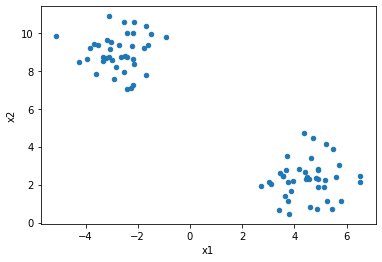
It looks like binomial logistic regression won't have trouble learning this data. Can you tell why?
Now that our data is ready, let's define our simple neural network (just one neuron)…
Defining our logistic regression classifier
There are actually several ways you can define a network in PyTorch. I'll show you one way and point you towards another. We'll define a class that extends PyTorch's nn.Module, and set a couple of attributes that for the components of our network:
class LogisticRegression(nn.Module):

    def __init__(self, input_size: int):
        super().__init__()
        # xW^T + b
        self.linear = nn.Linear(in_features=input_size, out_features=1, bias=True)
        self.sigmoid = nn.Sigmoid()

    def forward(self, x):
        z = self.linear(x)
        return self.sigmoid(z)
Our logistic regression defines . nn.Linear is one of the lego-like blocks we use construct a network in PyTorch. nn.Linear is a linear layer that performs the linear transformation . nn.Linear includes our weights and an optional bias. All we need to do is define how many incoming connections we have and how many neurons we want in this layer. For logistic regression, we just want a single neuron. You can peruse the PyTorch docs to learn about some of the other available layers in the nn package.
Our next component is our non-linear activation function, the sigmoid.
Any class that extends nn.Module must implement a forward(). The forward() method defines the forward pass of our network (input output). Through the "mathemagic" of autodifferentiation (PyTorch's implementation is called Autograd), PyTorch can figure out how to efficiently compute our backward pass for us. Talk about convenient!
Now that we've defined our network, let's train it using the data we generated earlier …
Train
First, let's set our random seed to keep thing reproducible. Then we'll create an instance of our LogisticRegression class that expects an input of two features:
# for reproducibility
torch.manual_seed(SEED)
# each datapoint in our X has two features
model = LogisticRegression(input_size=2)
We're almost ready to train. We need to define a loss function, an optimizer, our learning rate (i.e., how large each step should be when adjusting our parameters), and decide on a number of epochs (number of complete passes over the training data). We'll use the familiar binary cross entropy cost function for our loss and stochastic gradient descent as our optimizer.
EPOCHS = 50
# we'll use binary cross entropy as loss function
loss_fn = torch.nn.BCELoss()
optimizer = torch.optim.SGD(
    # we want to optimize ("fit") **all** of our model's parameters.
    # in the case of logistic regression, that's \mathbf{w} and b
    model.parameters(),
    # our learning rate
    lr = 0.01
)
Since our training data is so small (only 80 datapoints) and we have so few parameters, we'll just make a single update per complete pass over the training data. Normally, we'd split things into mini-batches. In a later tutorial, we'll look at how to do this easily by defining a PyTorch DataLoader. We'll also keep track of our loss for each epoch, so that we can visualize the network's learning process:
# put our model into training mode (i.e., tell it to calculate gradients)
model.train()
loss_tracker = []
print(list(model.parameters()))
for i in range(1, EPOCHS + 1):
    # IMPORTANT: clear out our gradients from the last epoch.
    model.zero_grad()
    y_pred = model(X_train)
    y_true = y_train
    loss = loss_fn(y_pred.squeeze(), y_true)
    print(f"Epoch {i} loss: {loss}")
    # backward pass
    loss.backward()
    # actually update our parameters
    optimizer.step()
    loss_tracker.append((i, loss.item()))
Quite a bit is happening in that block above. Let's review the crucial pieces:
- For each epoch, we ensure our gradient is reset to zero, rather than accumulating over many updates.
- We then make our predictions with
model(X_train)and calculate our loss (loss = loss_fn(y_pred.squeeze(), y_true)). - Next, we calculate our gradients (
loss.backward()). - Finally, we update our parameters (
optimizer.step()).
Plotting our loss
Let's take a quick look at the learning curve of our model:
loss_df = pd.DataFrame(loss_tracker, columns=["epoch", "loss"])
loss_df.plot.line(x="epoch", y="loss")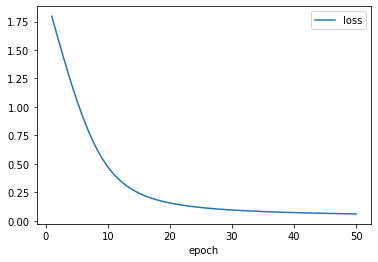
Not too shabby. Now, let's evaluate our model on the held-out test data…
Evaluate
Let's collect our predictions on the test data into a Pandas DataFrame and then feed that data to scikit-learn's classification_report:
# convert continous-valued predictions into a hard 1 or 0.
binarize = lambda preds: (preds > 0.5).long()

# don't calculate gradients when evaluating
model.eval()
with torch.no_grad():
    y_pred = model(X_test)
    y_true = y_test.long()
    pred_df = pd.DataFrame({'y_true':y_true,'y_pred':binarize(y_pred).flatten()})
    print(pred_df)
from sklearn.metrics import classification_report
y_hat = binarize(y_pred).flatten()
report = classification_report(y_true=y_true, y_pred=y_hat)
print(report)what's up with .eval() and with torch.no_grad()?
We've trained our model and fit our parameters. We no longer need to make any adjustments to them. the with torch.no_grad() context manager tells PyTorch that no gradients need to be computed for the block that follows. This is a convenient way of temporarily setting all of our parameters to requires_grad=False. Let's take a look…
print("with gradient calculations off:")
with torch.no_grad():
    print(model.linear.bias)
    # let's add two ...
    res = model.linear.bias + 2
print(res)print("with gradient calculations on:")
print(model.linear.bias)
res = model.linear.bias + 2
print(res)What do you notice?
why do we call binarize() here?
y_pred's values range between 0 and 1 (recall this is the output of the sigmoid). Let's take a look at the first few items in y_pred …
y_pred[:4]If we want hard predictions, we need to map these probabilities to 1 or 0. We'll treat anything .5 as class 1 as and anything .5 or less as class 0.
binarize(y_pred[:4])why do we need .flatten()?
Let's take a look at the shape of y_pred …
y_pred.size()20 rows x 1 column. Pandas is expecting a vector (rank-1 tensor) for its column. .flatten() does exactly this:
y_pred.flatten().size()Practice
You now know the basics of defining, training, and evaluating a neural network using PyTorch. Apply what you've learned by attempting the following challenges:
PyTorch provides several ways of defining neural networks. Rewrite
LogisticRegressionusingtorch.nn.Sequentialand retrain your network.Define an MLP two hidden layers each of 4 units and a final sigmoid activation. Train this MLP on your data. Is the learning curve any different?
Adjust the data generation procedure to produce 500 samples. Partition this data into 3 slices: train (80%), dev (10%), and test (10%).
Retrain your network on this data, but record your performance on the validation data at the end of each epoch. Plot this curve.
Next steps
Next, work through Datasets and DataLoaders in PyTorch to gather examples and their matching labels into batches.
If you would like to deepen your understanding of PyTorch, try working through the PyTorch intro tutorial series (official)