
tutorials
Introduction to containers
Overview
This lesson introduces you to the concept of containerization.
Outcomes
After reading this lesson, you should be comfortable…
- explaining how containerization is used
Prerequisites
This tutorial assumes that …
- you're already familiar with the concept of software dependencies
Background
What is a container?
It works on my machine!
It can be frustrating and time-consuming to identify system-specific differences that may interfere with how an application behaves on various machines and operating systems.1
Conceptually, containers provide a way of packaging an application and all of its dependencies (code, companion libraries, configuration files, etc.) so that it may be run uniformly/predictably on different machines and operating systems.
Containers achieve this by sharing the underlying operating system of the host. In this way, several containers can be run on a single machine running a single operating system.
For more information, see this article.
How is a container different from a VM?
A container is much more lightweight than a VM (smaller size and requires fewer resources), because it doesn't package a complete operating system.
Containers vs. VMs
| Containers | Virtual Machines | |
|---|---|---|
| Boot time | milliseconds | minutes |
| Operating System | Shared by containers running on same host | One OS per VM |
| Relative size | small (typically measured in MB) | large (typically measured in GB) |
Containers share the underlying operating system of the host. In this way, several containers can be run on a single machine with low overhead.
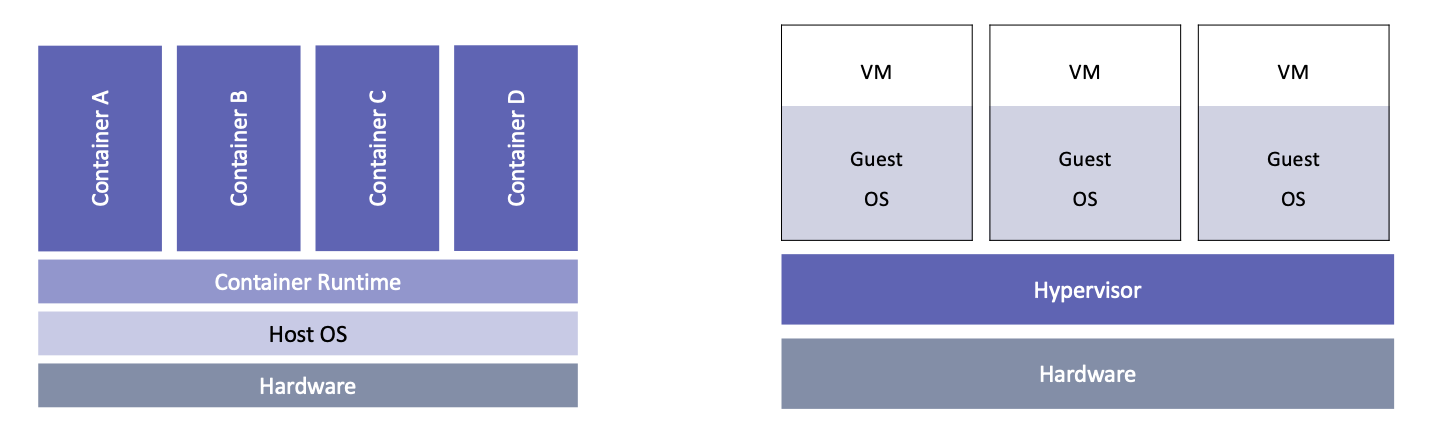
Unlike a virtual machine which might house many different applications, commonly a single container is used for each application to better isolate dependencies and minimize the potential for conflicts.
Why bother using containers?
Containers can be a great solution to many kinds of problems in software development both in industry and academia…
Scenario 1: You're developing a large software project that requires custom versions of several libraries. The installation steps are complicated and differ depending on the OS (ex. Windows vs Linux vs MacOS).
Scenario 2: You published a groundbreaking paper and need to release your code and data. You want to ensure researchers can replicate your results far into the future and make it easy for them to experiment with alterations.
Scenario 3: You need to run several very compute-intensive experiments on a cluster. You don't have adminstrative privileges on the cluster to install dependencies and your code was developed on a different OS.
Scenario 4: You have complex code that needs to run periodically when a web request is received. The server hosting your app doesn't have the resources to run a VM continuously and you're waiting for the VM to boot to answer each request and then shutdown will introduce too much latency.
Scenario 5: You need a portable development environment that is uniform across several machines.
Next steps
Now that you're familiar with the concept of containerization, take a look at the introductory Docker tutorial for a hands-on approach to learning about a popular implementation of containerization.
Further reading
Footnotes
- See https://en.wikipedia.org/wiki/Dependency_hell ↩
- Architectural comparison of containers and VMs. ↩